I Built a ServiceNow AI Assistant Instead of Licensing One
Enterprise platforms sell you an AI assistant by the seat. I built one that lives inside the platform, runs on token-billed LLM calls, and lets me decide what it can do.
The price of an AI assistant inside an enterprise platform is usually a second license stacked on the one you already bought. The vendor sells you the seats, then sells you AI for those same seats again, metered per person, every month, whether or not anyone opens it. I wanted to know how much of that bill is technology and how much is packaging, so I spent a few weekends building the assistant myself, inside ServiceNow, pointed at an LLM endpoint I already pay for. It does the things the expensive version does. It cost me tokens.
The assistant is a chat window on a ServiceNow portal page, the same place employees already go to file tickets and request things. You type a question, it answers, and when answering means doing something (pulling up your open incidents, searching the knowledge base, ordering a laptop from the catalog) it does that thing and shows its work. The model behind it is OpenAI’s GPT-4o, served through an Azure AI Foundry deployment. Azure bills it at $2.50 per million input tokens and $10 per million output, per Microsoft’s price list, and it handles tool calling reliably, which is the only capability this job really demands.
Where it runs matters as much as what it runs. The assistant lives inside the platform and executes as the logged-in user. When it reads a record, the query goes through GlideRecord, ServiceNow’s own data layer, with that user’s access controls already applied, so it cannot return a row the user wasn’t allowed to see. There is no second copy of who-can-see-what to build, sync, and get wrong, and that is the single biggest reason a project like this is sane to attempt solo. The scariest failure mode, leaking one user’s data to another, is handled by access rules the platform was already enforcing before I showed up.
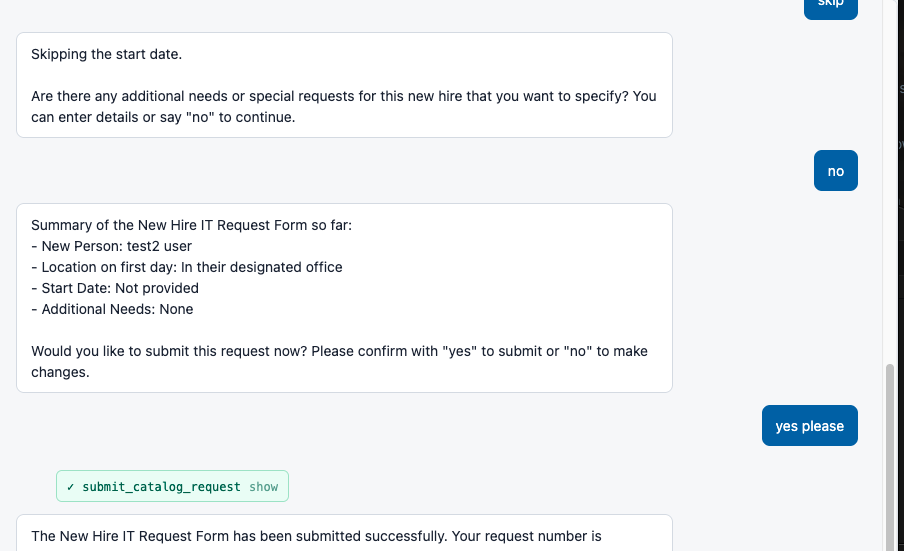
That screenshot is the assistant walking someone through a new-hire request, and the ordering path underneath it is the platform’s own. A search_catalog tool queries the service catalog, get_catalog_item pulls the item along with its variables (the same form fields the regular catalog form renders, choice lists included), and the assistant asks for each one in conversation. After the user says yes to a summary, submit_catalog_request calls sn_sc.CartJS().orderNow(), the same server-side API the portal’s own order button goes through. That creates a real REQ and RITM, so the real approvals, notifications, and fulfillment tasks fire downstream. There is no shadow ticketing system to reconcile later.
The cost structure follows from the same design. The vendor add-on prices like a subscription, a per-seat fee that scales with headcount and arrives every month forever, while this prices like electricity: the marginal cost of giving one more person access is the tokens their conversations burn. There is no separate hosting bill either. No servers, no auth system to stand up. The Foundry API key sits in a single ServiceNow system property typed password (2 way encrypted), and everything else (tool definitions, conversation state, job records) is rows in tables I already own.
The part I actually care about more than cost is control. Every capability the AI has is a row I create in a small tool-builder page I wrote for the purpose.
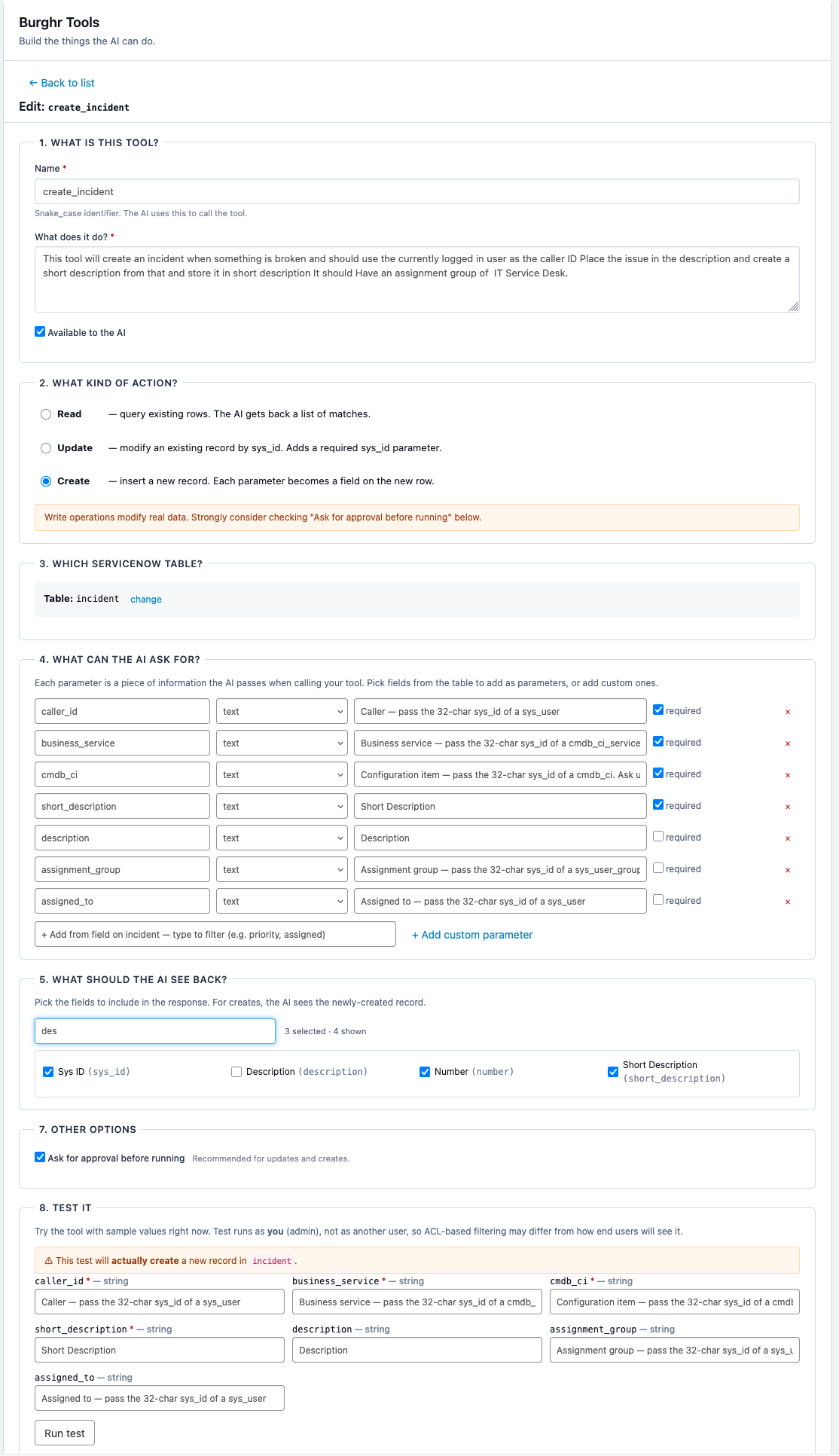
In that builder I pick whether a tool reads or writes, point it at a table, declare the parameters the model is allowed to pass, and write the description that tells it when to reach for the tool. Defining a create-incident tool took a few minutes, and the assistant could file tickets the next time I opened the chat. When I want it to do something new next week, I add a row and refresh.
When the AI hits the edge of what it can do, it hands off to a person.
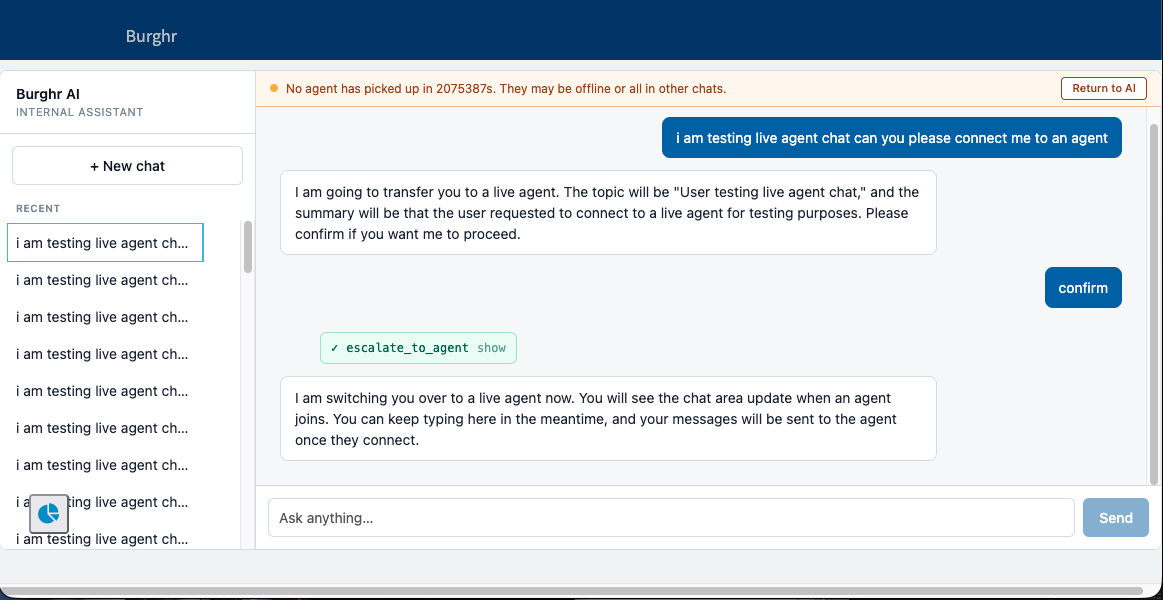
The handoff works by creating an interaction record, which Advanced Work Assignment, the routing engine behind ServiceNow’s standard chat, picks up and assigns to the same live-agent queue the regular chat bubble feeds. The user keeps typing in the same window while they wait, and the human on the other end sees an ordinary incoming chat with the AI conversation summarized at the top.
I’m not publishing the code yet, and I want to be specific about why. The tool builder has a “require user confirmation” checkbox, and right now that flag is stored but not enforced server-side; the only thing standing between the model and an unconfirmed write is the instruction telling it to ask first. It has asked reliably in my testing, and a hard gate is the next item on the roadmap, but a write path guarded by a polite suggestion is exactly the kind of edge that separates a working personal build from something you’d point at production data. Anyone who tells you their week-old AI agent is production-ready is selling something.
Building this was real work, and there is a fair reason vendors charge for the polished version: someone has to maintain the thing, and plenty of companies would rather rent that than own it. Still, the gap between a few weekends plus a token bill and a per-seat line item that compounds for as long as you have employees is wide enough to deserve a real look. The technology stopped being the hard part a while ago. What you’re mostly paying for now is someone else’s decision about what you’re allowed to do with it.