The M5 Pro Retired My Gaming PC Without Me Noticing
A few months with a 14-inch M5 Pro: four games benchmarked through GameHub and native Metal, local models up to a 44 GB coder at 128K context, and the heat that comes with it.
I never decided to stop using my gaming desktop. My GPU history says how much that machine used to matter: two GTX 1080 Ti in SLI, then a 3080 Ti, then a Radeon RX 9070 XT. Somewhere in the middle of that I picked up a Steam Deck, later an ROG Ally X, and without ever framing it as a change I started reaching for a handheld instead of the chair at the desk. The desktop kept the games that needed a real GPU. That list got shorter every year.
The laptop I bought in May finished the job. It is a 14-inch MacBook Pro with the M5 Pro, 18-core CPU, 20-core GPU, 64 GB of unified memory, 1 TB of storage, running macOS Tahoe. I paid $2,979. What I actually do on it is gaming and software development, plus running local language models to help with the development. The gaming was not supposed to be on that list. It turned out to be the part I keep telling people about.
Gaming was the part I expected to be embarrassing
It mostly wasn’t.
Three of the four games I tested have no Mac version at all. They are Windows builds, and they run through GameHub, the launcher I wrote about earlier this year. It stacks three translation layers and hides them behind a Steam-style front end: Apple’s Game Porting Toolkit 3.0 turns Direct3D 12 into Metal, Wine answers the rest of the Windows API, and Rosetta 2 handles the x86 code underneath. No config files, no per-title wiki. I pointed it at Final Fantasy VII Remake, Stellar Blade, and Hollow Knight: Silksong, and all three launched and played.
The fourth game is the control. Cyberpunk 2077 has a real native Apple Silicon port, so I ran it to see the same chip with none of the translation in the way.
| Game | How it runs | Resolution | Settings | Avg FPS |
|---|---|---|---|---|
| Hollow Knight: Silksong | GameHub (translated) | Native 4K | 2D, maxed | 110-115 |
| Final Fantasy VII Remake | GameHub (D3D12 → Metal) | Native 4K | High | 55-60 |
| Cyberpunk 2077 | Native macOS port | 4K, MetalFX DRS | Custom, RT off | 45 |
| Stellar Blade | GameHub (D3D12 → Metal) | 4K, FSR 3 Quality | Medium | 42 |
Silksong is the easy case and behaves like one. A 2D game holding 110-115 fps at 4K is not a benchmark anybody buys this laptop for, but it shows the launcher itself adds almost nothing when the GPU has room to spare. It also presents through Metal’s direct scanout path, with the macOS compositor out of the loop, which is the cleanest way a frame can reach the screen.
Final Fantasy VII Remake is the standout. The Metal performance HUD read a steady 55-60 at native 4K, with no upscaling and no frame generation anywhere in the pipeline. Sit with what that line is: an Intel-built Windows game, running x86 code under Rosetta, with its DirectX 12 calls rewritten to Metal on the fly, rendering a real 4K frame at close to 60. A couple of years ago that sentence would have been a punchline.
Then the two heavy games, which are where the actual finding is. Cyberpunk’s native port averages 45 fps. Stellar Blade, running through GameHub’s full translation stack, averages 42. Both output 4K, both lean on an upscaler to do it (Cyberpunk on MetalFX dynamic resolution, dropping its render scale as low as 50% of 4K; Stellar Blade on FSR 3 Quality at the Medium preset), and both have frame generation switched off, so those are real rendered frames, not interpolated ones. The native game and the triple-translated one finish three frames per second apart.
That gap, or rather the lack of one, is the result worth keeping. For a heavy modern game on this chip, going through GameHub instead of a native port costs you almost nothing measurable. The bottleneck is the GPU, not the layers of translation sitting on top of it. I would not stretch that into a clean native-versus-translated number, because these are different games with different upscalers and different render-resolution floors. As a neighborhood, though, it is clear: the translation tax that should be brutal is, in practice, a rounding error against the cost of rendering the frame at all.
The honest catch is in the resolution column. Only Silksong and FF7 render at true 4K. Cyberpunk and Stellar Blade both report 4K but upscale to it from a lower internal resolution, running Medium and Custom presets rather than maxed. The real picture is high settings with reconstruction, holding 45 to 60, which on a 14-inch laptop panel looks better than the asterisks read on paper. That is the expectation to set: high, upscaled, locked above 40, with the headroom spent on a smaller sharper screen instead of a native-4K-ultra trophy number.
For a sanity check I went looking for other people’s numbers. MacGamingDB has no M5 Pro entry for Stellar Blade yet, but an M4 Max reportedly manages around 70 fps at 1800p Ultra under CrossOver, and an M4 Pro clears 60 at 1440p with FSR Balanced and frame generation switched on. Mine runs a higher output resolution with no frame-gen crutch, so 42 sits about where it should. Cyberpunk lines up too: Mac results across chips run anywhere from the mid-20s to well past 100 depending on resolution and settings, and 45 at 4K output with dynamic resolution is mid-band for that spread.
What I did not hit in any of the four is a wall. Nothing refused to launch, nothing crashed mid-session, nothing needed a forum thread to coax into running. For a platform whose entire gaming reputation is “it doesn’t,” a 14-inch laptop quietly playing Stellar Blade at 42 fps is the more interesting headline than any single frame count.
Local AI is where this chip earns its price
I run local language models on this laptop most days, so the on-device AI numbers mattered to me more than anything on Apple’s spec page. I put three machines I’ve owned through the same workload: a 2019 Intel MacBook Pro with the Core i9-9980HK, an M3 MacBook Air, and this M5 Pro. Both older machines have 16 GB of memory. The harness is a small open tool called AI-Bench that hands a local model one prompt (build a complete single-page web app, no frameworks), runs it three times after a warmup, and records how fast the model generates tokens. Same prompt, same Ollama backend, all three machines.
I tested two models pulled through Ollama: Qwen3 1.7B, a small 1.3 GB model, and Gemma 4 8B at Q4_K_M, which is multimodal and lands at 8.9 GB on disk once its vision and audio encoders are counted. The numbers below are raw generation speed read straight from Ollama, not wall-clock time, so model loading and agent overhead stay out of the figure.
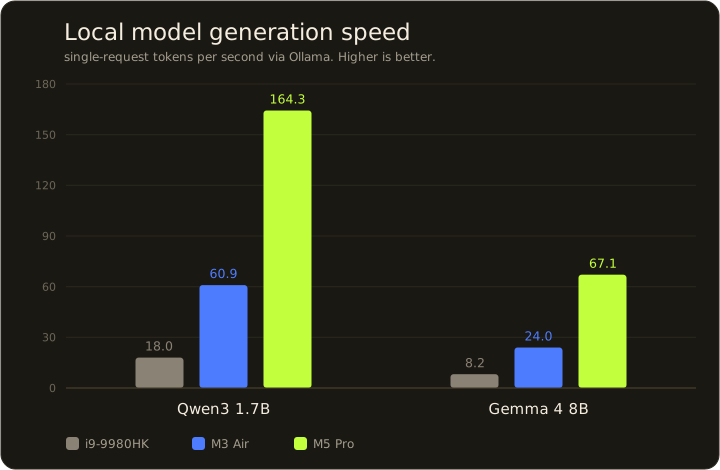
The M5 Pro lands around 2.7 times the M3 and 8 to 9 times the Intel machine, and that multiplier barely moves between the two models. At 164 tokens a second the small model generates faster than I can read the screen. At 67 on the bigger model it’s still well clear of the point where you feel yourself waiting on it. The i9 doing 8 tokens a second on that same model is the local-AI experience I remember from a few years ago: send the prompt, go refill your coffee, come back to a half-finished answer.
Raw speed is the easy half to measure. What decides whether you can run a model at all is memory, and the 64 GB config does something here the spec line undersells. Apple Silicon shares one pool of memory between the CPU and GPU, so model size is bounded by total RAM rather than a separate, much smaller video-memory budget. I pulled Llama 3.3 70B at a 4-bit quant, 42 GB of weights. It loaded to 45 GB resident, ran fully on the GPU, and generated at 6.5 tokens a second. A 16 GB Air cannot do that at any speed, since 45 GB is three times its entire memory.
That number comes with an asterisk I would want before handing over three grand. I ran the 70B at an 8K context window, which is what let it fit, and 8K is far too small for real coding. An agent working across a handful of files and their tests wants 64K at a minimum, and in practice I run more. Context is not free: the key-value cache on this model runs about 0.3 MB per token, so a full 128K window adds roughly 40 GB on top of the 42 GB of weights. 82 GB against 64 is exactly why my first attempt, at Ollama’s default 128K context, swelled to 86 GB, spilled onto the CPU, and timed out with no output.
So the real ceiling is the weights and the context together, and at the top end 64 GB will not hold both, at least not the way Ollama loads it. That is still far beyond what a 16 GB laptop can attempt, and it is not the run-anything ceiling the 64 GB headline implies on its own. It was also the point where I went looking for a better way to run big models for real work.
What I actually run now
For everyday coding I left Ollama behind. These days I run oMLX, a server built for Apple Silicon, serving Qwen3-Coder-Next as a 43.9 GB 4-bit model. Two things make that pairing work where the 70B didn’t. The model is a mixture-of-experts, so despite 44 GB on disk only a few billion parameters fire per token, which keeps generation fast. And oMLX manages its key-value cache in two tiers, hot blocks in RAM and cold blocks spilled to SSD, so context that outgrows memory pages to disk instead of killing the process.
At a normal coding context it generates around 80 tokens a second. A 44 GB model keeping pace with the 8 GB Gemma from the chart above, at roughly twelve times the speed of the dense 70B, is the case for mixture-of-experts in one line. Then I walked the context up to see where it bends.
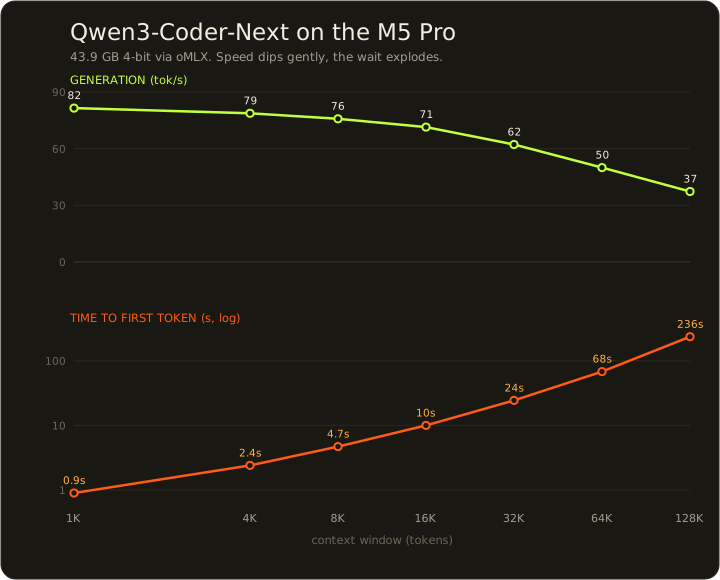
Generation slides from 81 tokens a second to 37 as the context climbs to 128K. That is slower. It still clears the speed where you feel yourself waiting on each token. The column that bites is the other one. Time to first token goes from under a second to nearly four minutes, because the model has to read the entire 128K-token context before it writes a single word. That is the real tax on a huge window, and no spec sheet mentions it.
Getting 128K to run at all surfaced a ceiling I did not know was there. Peak memory climbs from 43.1 GB at a 1K context to 54.7 GB at 128K, and macOS caps how much memory the GPU may hold at about 52 GB on a 64 GB machine. oMLX refused the run until I raised the cap by hand with one command (sudo sysctl iogpu.wired_limit_mb=61440) and let it reach 60 GB. So the usable ceiling on a 64 GB Mac is not the number on the box, it is Apple’s Metal limit until you go change it.
Past 128K is a hard wall. A 200K or 256K context in a single pass needs more memory than the machine physically has, and no setting moves that. I still set my limit to 256K, and it earns its place, because a coding session fills context gradually rather than all at once. oMLX keeps the reusable blocks cached and pages the cold ones to SSD, so I almost never need the whole window resident in one shot. The 256K I set is a budget for a long session, not a wall I hit every time.
If small models are all you run, the M3 Air already does 60 tokens a second and you do not need to spend M5 Pro money to be happy. What the M5 Pro buys is headroom: it holds that speed as the model grows, and the 64 GB lets you run a 44 GB mixture-of-experts coder model with a genuinely large context, which neither of the other two can hold. None of this replaces a frontier model from Claude or anyone else, and I still pay for one. It supplements it, and the supplement now covers enough of the day that the split feels worth the hardware. For local model work specifically, this is the first time a Mac laptop has felt like the right tool rather than a compromise I kept talking myself into. If you want the software side of that setup, my local LLM post covers the harnesses I use with it.
It runs hot and loud, and holds its clocks anyway
Under sustained GPU load this machine gets uncomfortably hot. Not warm. Hot enough that the keyboard deck becomes unpleasant to type on, and not something I would put on a bare lap. The fans are loud too, an actual presence in the room rather than a background hiss. Both of those are real, and anybody telling you a thin laptop pushing a 4K game stays cool and silent is describing a different machine.
Then I ran the throttle test, expecting it to be the second half of that complaint, and got the opposite. 3DMark’s Steel Nomad Stress Test loops a punishing scene twenty times, about twenty minutes of the GPU pinned near 100%, which is harsher than any real game. The M5 Pro scored 97.72% stability, best loop 2328 against a worst loop of 2275. That is a 2.3% spread across twenty minutes, and the frame-rate-over-time chart is flat for the entire run. This was plugged in and docked to an external display, which is the standard way to run the test and also the case where the heat bothers you least, so read it as the desk scenario rather than the lap one.
The performance does not sag. That reframes the heat rather than excusing it: the cooling system is holding clocks steady, and the price of holding them is heat pushed into the chassis and fans spun up to move it. Sustained load costs you comfort here, not frames.
It also is not a regression. My 2019 i9 ran at least as hot under the same kind of load, and the M3 Air felt hotter still on long sustained work, which makes sense for a fanless machine with nothing to pull heat out of the chassis. High-performance laptops get hot. This one is no worse than what I already owned, and better than the Air. Docking removes the problem entirely, since an external keyboard puts your hands somewhere else and fan noise stops mattering a few feet away.
Who should buy this
If you already game mostly on handhelds and want one machine for work, development, local models, and the sessions where you sit down at a desk, this is it. That is the honest shape of my own use, and it is why the desktop went quiet. The dedicated gaming PC stopped having a job that this laptop could not do well enough.
If you want a no-compromise gaming rig, keep the PC. Forty-two frames at upscaled 4K is genuinely impressive for a 14-inch laptop and genuinely not what a 9070 XT does. And if you will only ever use it on your lap, never docked, weigh the heat and the fans harder than I am weighing them, because I solved that problem with a dock and you might not want to.
On price, mine cost $2,979 in May and I would spend it again. Buying the same thing today costs more: Apple raised prices across the Mac line on June 25, blaming a memory and storage shortage that Tim Cook called a “hundred-year flood,” with the base 14-inch MacBook Pro going from $1,699 to $1,999 per MacRumors. The component that got expensive is exactly the one this review keeps leaning on. A 64 GB config is the whole reason a 44 GB model runs at all, and memory is what Apple is now charging more for.
The display is beautiful, as Mac panels reliably are. It is a 14.2-inch Liquid Retina XDR at 3024x1964, 1000 nits sustained with 1600 peak in HDR, and adaptive refresh to 120 Hz. I do not own a colorimeter and I am not going to pretend I can tell you how it measures against a reference monitor. It looks great, games look great on it, and that is the extent of what I can honestly claim.
Battery I barely think about, which is the highest compliment I can pay it. I never tracked a number worth publishing, so I am not going to invent one. It lasts long enough that it stopped being a thing I plan around.
What I keep coming back to is the FF7 line. A Windows binary, x86 instructions translated on the fly, DirectX rewritten into Metal, rendering native 4K at 55 to 60 frames on a laptop I bought to write code on. The Mac gaming story has been “close, eventually” for a decade. This is the first machine I have owned where it is just true.