Hop
An address bar for Finder. Type a path, press Enter, and Finder is there.
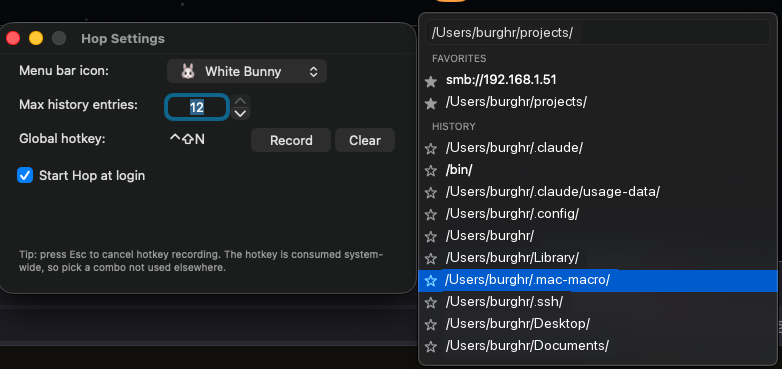
Finder has no address bar. Hop is one. Click the bunny in the menu bar or press the hotkey, start typing a path, and press Enter. Finder opens there.
Paths tab-complete as you type. The places you went recently stay in a history list, anything you use constantly can be starred as a favorite, and an smb:// share works the same as a local folder. Set the hotkey, the menu bar icon, and how much history it keeps in settings, and tell it whether to start at login.
Install
- Clone the repo.
- Run the installer:
./install.shIt sets Hop up as a login agent, so the bunny is in your menu bar from the next restart onward. ./uninstall.sh takes it back out.
More apps
MacroDeck A grid of buttons in the menu bar that runs the things you keep doing by hand. MacMixer Sets the volume of each app separately, from the menu bar, with no audio driver to install. TerminalSpace A terminal built around projects, where a workspace keeps its panes, its folder, and its agent session.