MacMixer
Sets the volume of each app separately, from the menu bar, with no audio driver to install.
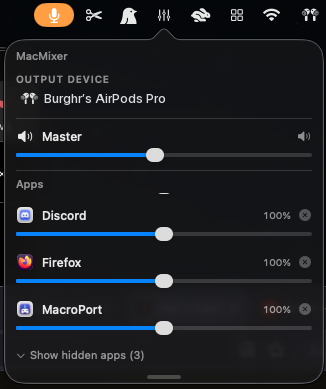
Set the volume of each app separately, from the menu bar. Music at 30 percent, the game at full, a meeting somewhere in between, without touching any of their own volume controls. There is a master slider above them, and the apps making no noise stay collapsed until you ask for them.
Other mixers do this by installing an audio driver and routing everything through it, which is why they leave the orange microphone dot in your menu bar forever. MacMixer uses a newer piece of macOS instead, so there is no driver, no microphone indicator, and nothing to uninstall later.
Install
- Download the zip and unzip it.
- Drag MacMixer to your Applications folder.
- The first launch is blocked, because the app is signed but not notarized. Open System Settings, go to Privacy & Security, scroll to Security, and press Open Anyway. On macOS 14 you can right-click the app and choose Open instead.
The sidebar has the terminal version of that last step if you prefer it.